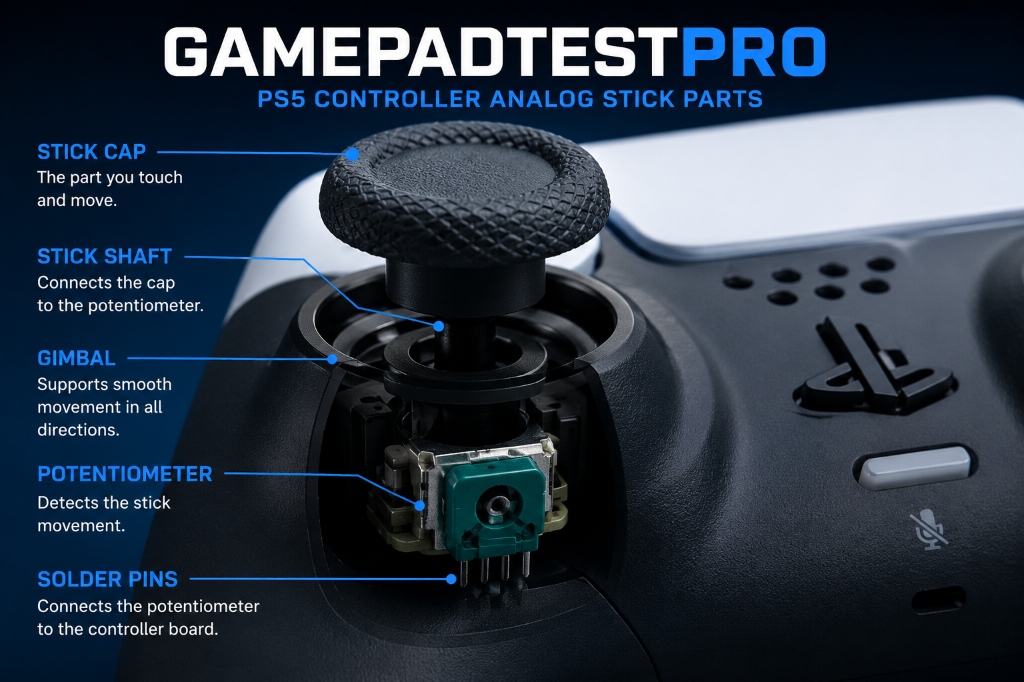
Stick Drift is a common controller issue in which the joystick starts moving on its own without being touched. As a result, the camera, character, or aiming in a game may begin to move automatically, even though the player is not using the joystick. This problem is usually caused by a faulty analog stick, dust buildup inside the controller, or prolonged use over time. If the issue is not addressed promptly, it can negatively affect the gaming experience because the player loses accurate control of the game, making it more difficult to play. Therefore, timely testing and repair of stick drift are important to ensure the controller performs properly and provides a smooth and enjoyable gaming experience.
How to Know If Your PS5 Controller Has Stick Drift
- Character Moves Without Touching the Joystick
- Camera Rotates Automatically
- Aim Moves on Its Own
- Check Your Controller Using a Stick Drift Tester
Before trying to fix stick drift, it is important to determine whether the issue is actually caused by stick drift or another controller problem. Sometimes users mistake minor controller issues for stick drift. Fortunately, there are several clear signs and simple tests that can help you identify whether your PS5 controller is experiencing stick drift.
Character Moves Without Touching the Joystick
One of the most common signs of stick drift is when your in-game character starts moving on its own without any input from the player. For example, if you are standing still in an open-world or shooting game and your character slowly moves forward, backward, or in a particular direction, your controller may be suffering from stick drift.
Camera Rotates Automatically
If the camera continuously rotates in one direction or the game view moves up, down, left, or right without any input, it could indicate a problem with the right analog stick. This issue is especially noticeable in first-person shooter (FPS) and third-person games, where precise camera control is essential for gameplay.
Aim Moves on Its Own
Another common symptom of stick drift appears in shooting games when the aim or crosshair starts moving automatically. If you are trying to target an enemy but your aim keeps drifting to one side, there is a good chance that your controller has stick drift. This can make accurate aiming difficult and negatively affect your gaming performance.
How Much Does the PS5 Stick Drift Repair Cost?
PS5 stick drift repair ki cost maslay ki nature par depend karti hai. Agar sirf cleaning ya minor repair ki zaroorat ho to kharcha kam ho sakta hai. Lekin agar analog stick module replace karna pade to repair cost barh sakti hai. Repair karwane se pehle technician se estimate lena behtar hota hai taake aap repair aur replacement ke darmiyan behtar faisla kar sakein.
Update PS5 Controller Firmware
Outdated controller firmware can sometimes contribute to issues such as stick drift. Sony regularly releases firmware updates that improve controller performance, stability, and compatibility. Connect your PS5 controller to the console and check for available updates. After installing the latest firmware, test the controller again to see if the issue has been resolved.
Recalibrate the Analog Stick
Kuch situations mein analog stick physically theek hoti hai lekin uski calibration disturb ho jati hai. Jab controller joystick ki neutral position ko sahi tarah detect nahi kar pata to unwanted movement nazar aa sakti hai. Controller ko reset karne aur calibration tools ki madad se analog stick ko dobara calibrate karna is maslay ko kam ya khatam kar sakta hai.
Is PS5 Stick Drift Covered Under Warranty?
Agar aap ka PS5 controller warranty period ke andar hai, to stick drift ka masla warranty ke tehat cover ho sakta hai. Warranty policies region aur seller ke mutabiq mukhtalif ho sakti hain, is liye repair karwane se pehle Sony ya apne retailer ki warranty conditions zaroor check karein. Agar controller warranty mein ho to aap repair ya replacement ki sahulat hasil kar sakte hain.
Check Your Controller Using a Stick Drift Tester
One of the easiest ways to confirm stick drift is by using an online Stick Drift Tester. Connect your PS5 controller to a computer or mobile device using USB or Bluetooth and open the tester tool. If the joystick indicator or axis moves on the screen without you touching the stick, it is a clear sign of stick drift. This method allows you to quickly verify whether the issue is caused by stick drift or another controller problem. By recognizing these symptoms and performing a simple stick drift test, you can easily determine whether your PS5 controller is affected by stick drift. Early detection can help improve your gaming experience and prevent further damage to your controller.
What Causes Stick Drift in a PS5 Controller?
Stick Drift in a PS5 controller can occur for several reasons. In some cases, the issue is minor and can be resolved simply by cleaning the controller, while in other situations, internal components may need to be repaired or replaced. Understanding the root cause of the problem is important because it helps you choose the right solution and avoid unnecessary repair costs.
Dust and Dirt Buildup Around the Joystick
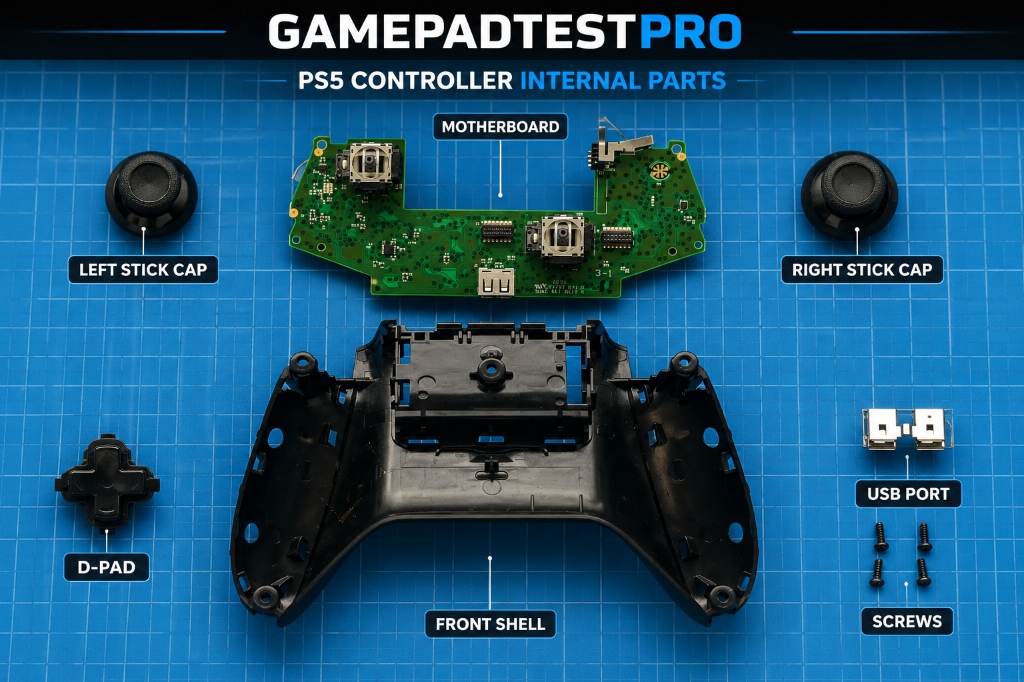
The accumulation of dust, dirt, and small particles around the joystick is one of the most common causes of stick drift. Over time, these particles can enter the analog stick mechanism and interfere with its movement. If the problem is caused only by dust and debris, a thorough cleaning can often resolve the issue.
Wear and Tear of Analog Components
The electronic components inside the PS5 controller's analog sticks gradually wear out with continuous use. When these parts lose their accuracy, the controller can no longer detect the joystick's position correctly. As a result, stick drift may occur. This problem is especially common among gamers who spend several hours playing games every day.
Calibration Issues
Sometimes the joystick is physically in good condition, but software or calibration issues can cause symptoms similar to stick drift. If the controller cannot correctly recognize its neutral position, even slight movements may generate unwanted inputs in the game. In such cases, resetting or recalibrating the controller may help resolve the issue.
Hardware Damage from Excessive Use
Long term use can put stress on the controller's internal hardware. Frequently pressing or aggressively moving the joystick can weaken its internal components over time, increasing the chances of stick drift. In some cases, repairing or replacing the damaged parts may be necessary to restore proper controller performance.
Clean the Joystick to Fix Stick Drift
Dust and debris buildup around the joystick is one of the most common causes of stick drift. Carefully cleaning the analog stick with compressed air or a soft brush can help remove dirt that may be affecting its movement. In many cases, a simple cleaning can restore normal controller performance and reduce unwanted joystick input.
Reset Your PS5 Controller
Sometimes stick drift can be caused by temporary software or calibration issues. In such cases, resetting your PS5 controller may help resolve the problem. Use a small pin to press and hold the reset button on the back of the controller for a few seconds, then reconnect it to your console. In many cases, a simple reset can improve joystick performance and reduce stick drift.
When Cleaning and Resetting Do Not Fix the Problem
If stick drift continues even after cleaning the joystick and resetting the controller, the issue may be related to faulty internal components. In such cases, additional repairs or part replacements may be required to completely resolve the problem
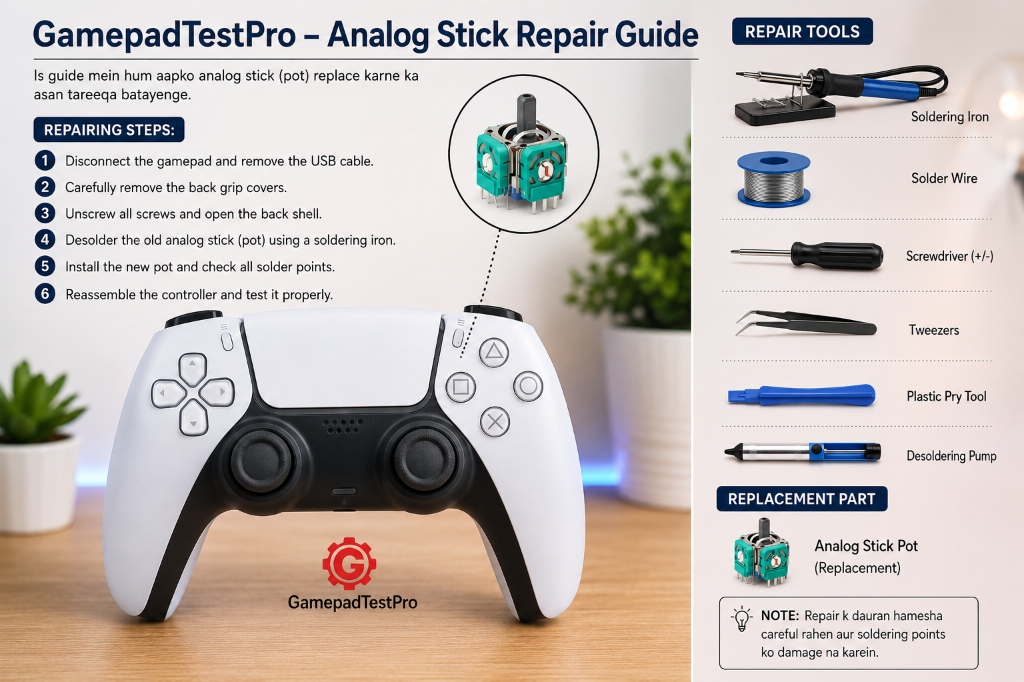
Replace the Analog Stick Module
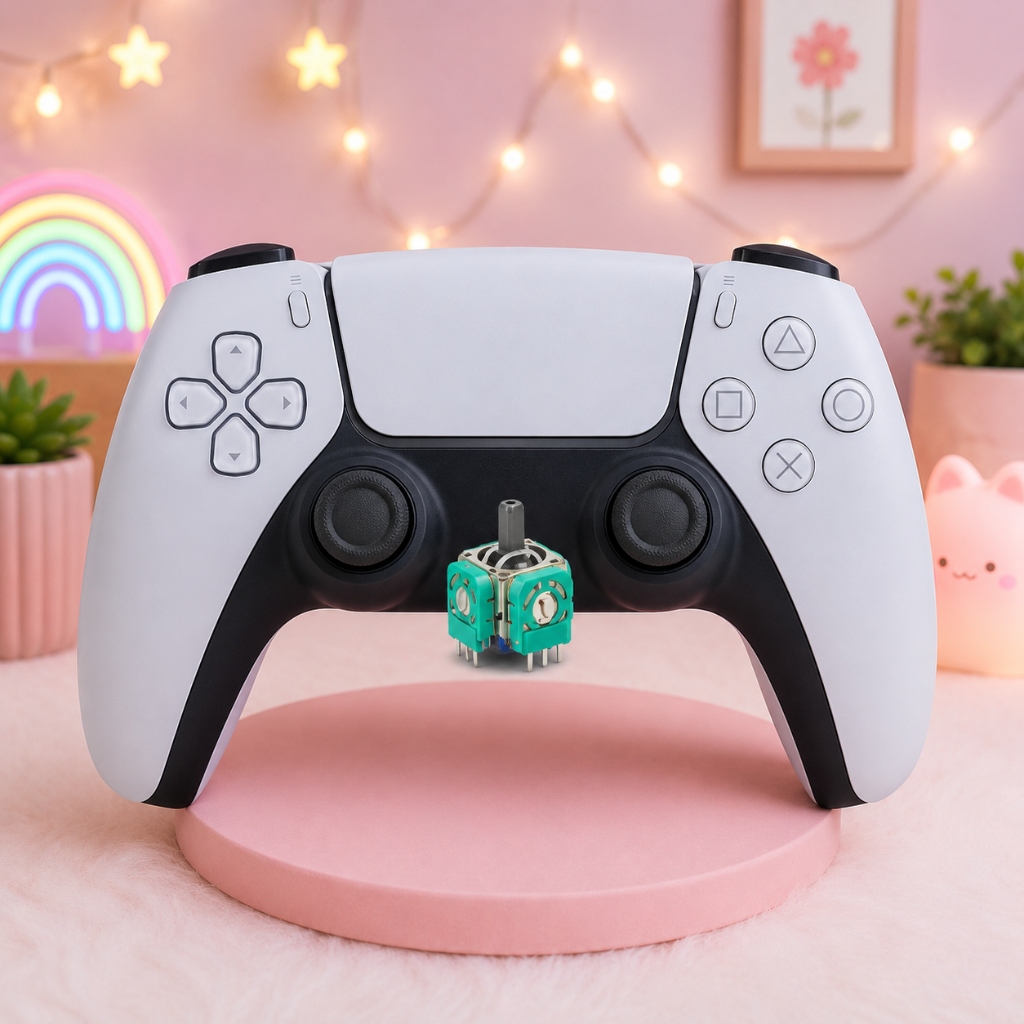
If the analog stick module is damaged or heavily worn out, replacing it may be the best solution. Installing a new analog stick module can restore proper joystick functionality and help eliminate stick drift.
Install Hall Effect Sensors
Hall Effect sensors are a more advanced and durable technology compared to traditional analog sticks. They use magnetic sensing technology, which reduces the chances of developing stick drift over time.
Seek Professional Repair Assistance
If you are not comfortable opening the controller or replacing internal components yourself, it is best to seek help from a professional technician. An experienced repair expert can identify the exact cause of the problem and perform the repair safely and effectively.
How to Prevent Stick Drift in the Future
While stick drift is a common controller issue, proper care and maintenance can significantly reduce the risk of it developing over time. Keeping your PS5 controller clean, protecting it from dust and moisture, and using the analog sticks carefully can help extend its lifespan and maintain smooth performance. Following a few simple preventive measures can save you from costly repairs and improve your overall gaming experience.
Keep Your Controller Clean
Regular cleaning is one of the easiest ways to prevent stick drift. Dust, dirt, and debris can build up around the analog sticks and interfere with their movement. Gently cleaning your controller with a soft cloth or compressed air can help keep the internal components functioning properly and reduce the risk of unwanted joystick input.
Protect It from Dust, Dirt and Moisture
Exposure to dust, dirt, and moisture can damage the internal components of your PS5 controller and affect analog stick performance. To minimize the risk of stick drift, store your controller in a clean, dry environment and avoid using it with dirty or wet hands. Proper storage can help preserve the controllers long term reliability.
Store Your Controller Safely
Placing your controller in a secure location when it is not in use can help prevent accidental drops impacts and physical damage. Even minor damage to the analog stick mechanism can contribute to stick drift over time. Using a protective case or storing the controller on a stable surface can help keep it in excellent condition.
Avoid Putting Excessive Pressure on the Joysticks
Applying too much force to the analog sticks during gameplay can accelerate wear and tear on the internal components. Try to use smooth and controlled movements instead of pressing or pushing the joysticks aggressively. Careful handling can help maintain accurate input detection and reduce the likelihood of stick drift developing in the future.
Frequently Asked Questions .
Can Stick Drift Be Fixed Permanently?
Yes, stick drift can often be fixed permanently if the cause is identified correctly. Cleaning, recalibration, or replacing the analog stick module can resolve the issue in many cases.
Can Cleaning Alone Fix Stick Drift?
Yes, if stick drift is caused by dust or debris inside the analog stick. However, worn or damaged components may require repair or replacement.
Is It Better to Repair the Controller or Buy a New One?
If the damage is minor, repairing the controller is usually the more affordable option. For severe or multiple hardware issues, buying a new controller may be a better choice.
What Is the Best Tester for Checking Stick Drift?
An online Stick Drift Tester or Gamepad Tester is one of the easiest ways to detect stick drift and check whether your controller is functioning properly.
Can Stick Drift Get Worse Over Time?
Yes, if left untreated, stick drift can gradually become worse and affect gameplay more frequently.
How Long Does a PS5 Controller Usually Last?
With proper care and maintenance, a PS5 controller can last for several years before showing signs of wear and tear.