The Secret of Left-Heavy Right-Light Controller Vibration
Ever notice your controller's left side thumps while the right side buzzes lighter? That's a dual motor system, and when one side weakens, feedback can feel off without an obvious reason. GamepadTesterPro lets you test both motors individually online to see exactly which one needs attention.
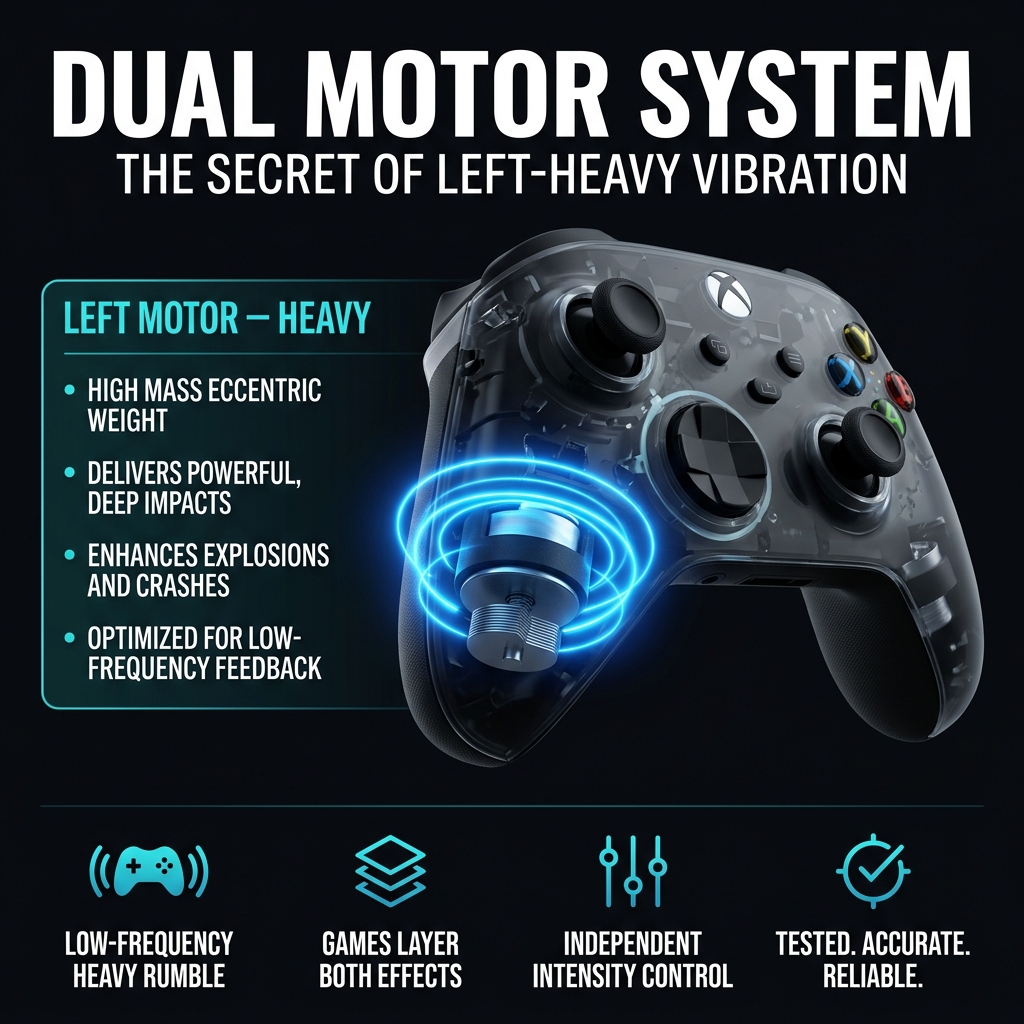
Two Motors. One Richer Experience.
Most modern controllers use two separate vibration motors instead of one. Each motor produces a different type of feedback, and together they create a more realistic rumble during gameplay than a single motor ever could.
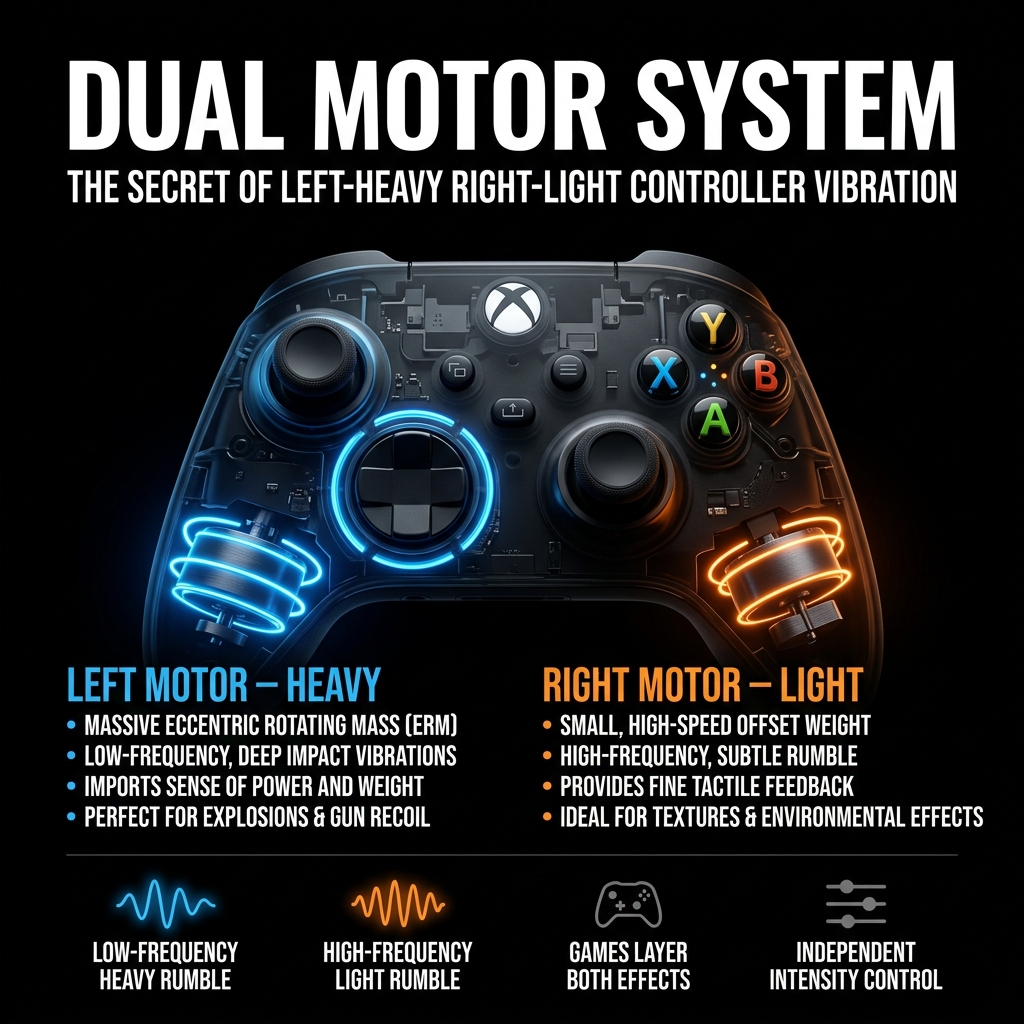
Each motor spins at a different rate to produce its own distinct feel, and games combine both for richer feedback — from a deep explosion to a quick tap, more convincingly than one motor could.
- Larger, slower-spinning motor
- Produces deep, low-frequency rumble
- You feel it through your whole hand
- Triggered by explosions, crashes, impacts
- Smaller, faster-spinning motor
- Creates high-frequency subtle buzz
- Felt mostly at your fingertips
- Used for taps, rain, engine hum
Frequency, Not Just Size
The left motor's slower spin creates stronger vibration you feel through your whole hand. The right motor's faster spin produces a subtler buzz that's easy to miss whenever the left motor is also active. Games trigger both at different intensities, layering heavy and light vibration to create a more textured feel.
Low-Frequency Heavy Rumble
Slower spin creates stronger vibration that resonates through your whole hand, not just fingertips.
High-Frequency Light Rumble
Faster spin produces a subtler buzz — easy to miss whenever the left motor is also active.
Games Layer Both Effects
Most games trigger both motors together at different intensities for a richer, more textured feel.
Independent Intensity Control
Each motor can be set from 0–100% separately, allowing precise testing and custom patterns.
Both Motors Checked In Under a Minute
GamepadTesterPro checks both motors individually right in your browser, with no installation needed.
Connect Your Controller
Plug in via USB or pair over Bluetooth. The tool detects it automatically.
Run the Vibration Test
Start the test — each motor activates so you can feel exactly how each performs.
Check Left Motor Response
Confirm the left motor produces a strong, heavy rumble without delay or weakness.
Check Right Motor Response
Confirm the right motor produces its lighter, faster buzz clearly and consistently.
Compare Motor Strength
See both results to spot any imbalance between the two motors beyond their normal difference.
Testing Isn't Just for When Something Feels Wrong
After Dropping Your Controller
A drop can loosen an internal connection even if the controller still looks and works fine.
When Vibration Feels Weak
If rumble feels softer than you remember, a quick test confirms whether it's a real motor issue.
Before Buying Used
Checking both motors first helps you avoid inheriting someone else's hardware problem.
After Repair or Cleaning
Confirms everything was reconnected properly and both motors are working as expected.
Catch Issues Before They Affect Gameplay
Weak Vibration Motor
A motor running noticeably softer than expected usually points to wear or a loose internal connection.
One Motor Not Working
If only one side vibrates, the other motor has likely failed or lost its connection entirely.
Uneven Left and Right Rumble
A strength gap beyond their normal difference signals a developing problem worth addressing early.
Delayed Vibration Response
A motor that kicks in late suggests a wiring or connection issue rather than the motor itself failing.
Issues GamepadTesterPro Most Often Confirms
Most of them are easier to fix than people expect once you know which motor is actually affected.
Left Motor Not Working
Usually caused by internal wear or a disconnected wire after heavy or long-term use.
Right Motor Not Working
Often linked to a loose connection, since the smaller motor sits in a tighter space inside the controller.
Controller Vibrates Too Weakly
Can point to a low battery on wireless controllers, or motors nearing the end of their lifespan.
No Vibration in Games
Sometimes a game setting or system permission is disabled rather than a hardware fault — worth testing here first.
Random or Constant Vibration
Usually a sign of a stuck motor or a software glitch rather than a permanent hardware issue.
Built for Real Results
Real-Time Motor Testing
Each motor responds instantly on screen the moment it activates, with no delay in results.
No Software Installation
Everything runs directly in your browser. Nothing to download or configure.
Safe and Private
All testing happens locally — nothing about your controller is ever stored or sent anywhere.
Multiple Controller Brands
Supports PlayStation, Xbox, Switch, and most generic PC controllers, all in one place.
Works With Most Modern Controllers
Works on Chrome, Edge, Opera, and Brave. A USB connection is recommended for the most reliable vibration testing.
What Your Test Tells You
Both motors respond instantly. Left feels noticeably heavier than the right — this is expected and correct.
Weaker output over time, delayed response, or inconsistent strength between repeated tests.
If a motor stays silent or extremely weak across multiple tests, the controller likely needs repair or replacement.
Frequently Asked Questions
Two separate motors — one heavier and one lighter — working together to create more realistic vibration feedback than a single motor could produce.
It spins at a lower frequency, which naturally produces a heavier, more noticeable rumble that resonates through your whole hand.
Yes — GamepadTesterPro tests both motors individually, right in your browser, for free. No downloads or accounts needed.
This usually means the other motor has failed or lost its internal connection. The test will confirm which motor is affected.
Yes — along with PS4, Nintendo Switch Pro, and most generic USB PC controllers. USB connection gives the most reliable results.
Yes, especially in games that use vibration cues for aiming, damage feedback, or environmental effects like rain and engine rumble.
A noticeable imbalance beyond the normal left-right difference usually means one motor is wearing out faster — a quick test will confirm this.
No — everything runs directly in your browser. Nothing to install, no account required, completely free.